Hey 193,
Id love to check it out.
if I can. I didnt get far with AKU as I could work out how to change the tail shape then it wanted extra money to auto rocker profile change so intersted in what youve come up with.
Thanks
Simpler - Possibly but read about what’s going on below. I’d highly suggest that if you haven’t played with Chat GPT, Grok, Perplexity, Claude etc, just do a search and go to the websites and try them. They are pretty amazing for research, planning document review, and many things. You can have them read a thousand page document in a few seconds and then spit out a summary of what you care about and a million other things. It doesn’t matter if your growing grass or reviewing a detailed contract proposal.
To use the App there’s minimal knowledge needed in terms of getting the guides created. Just click the “How it Works” button. Bottom line is that after the interview an analysis is performed. Regardless of the analysis results or recommendations, you can generate the guides. There’s a Green button always visible on the right. That’ll bypass the back and forth to correct things caught by the system (Wrong board for your desires, experience etc). Otherwise, make the corrections and hit the Blue button as instructed once you tweak the design and get scores up. You will be taken to the list of guides. (7 in total). Just select one. When you do, you will be given a choice of which AI service you want to use. Click one. Click on one. When it opens, click the prompt box where you’d type a question. Instead of typing something, right click (hold down on phone) and select “paste”. Then hit enter or select the symbol in the chat box to enter. Your entire customized guide for that step will be written almost instantly with links, steps, recommendations etc. The idea is that you can return when ready to do the same for the next step. You can engage the chat further, asking it questions about your specs, volume etc. It will know everything from the interview and your spec already so you can just carry on the research and tell it to update the guide yourself. If you signed up (no pay but maybe an email…no different than many free services), your Chats will always be there to recall to carry on. BTW, it’s an excellent tool for research. I had it crawl every travel service out there and spit out a list of the best flights, times, fee structure, seating etc in a table so I could avoid the pain. Just handed it to my wife and said pick one. Done. So, it’s worth learning regardless of the App.
In the AI world, the public used services like Chat GPT use Tokens to measure user activity. When Token allocations exceed the free limit, the service will tell you you’ve run out of questions…and then tell you to try a few hours or even a day later when the reset. Its like having enough for a few questions to draw you in, then cut off with a prompt to upgrade. There’s plenty allocated for most small research projects and you can come back the next day to continue so it’s not a big deal assuming you have an account set up and can return to chats saved under your profile.
Simpler, yes. The drawback of making this free is the need to work outside of the App. I have a paid model too but haven’t turned it on. It’s about .75 cents for all seven tutorials. (A small cost calculated by breaking the 7 tutorials into an average surfboard build and corresponding token useage) but it will use a powerful AI engine to immediately create the tutorial and give you a .pdf. Another simpler method might be to generate all 7 tutorials at once but that’d task a very large workload and likely break the free service token limits for Chat, GPT, Grok, Perplexity, Claude and Gemini.
I’ll keep this in mind. I’ve already eliminated unclear, duplicated or unnecessary stuff. In testing, remnants will remain here and there while I tackle the bigger challenges. More to follow.
John
Cool. Play around with it. It’s got a few bugs but enough to give you. Here’s an assessment from Perplexity. I may tweak a bit more but a good starting point to give you an idea of what it can do. Just carry on the chat after you create the guide.
John
The SurfCraft specs and prompt provided sufficient and correct information to design a well-sorted modern fish for the described user.
Design adequacy
The target dimensions (6’0.25" × 21.25" × 2.375") with a 32.6 L goal align with proven modern-fish ranges for a 160 lb intermediate, balancing easy paddle, glide, and responsive rail engagement without excess bulk. The quad setup complements a wide swallow/fish tail by adding drive and hold while preserving speed and quick redirection—consistent with a modern, fast fish brief. The material callout (PU blank, 6 oz + 6 oz deck and 6 oz bottom, polyester resin) matches a classic flex/weight profile that suits the lively, down-the-line feel targeted here. The rocker guidance you asked about earlier—relaxed overall with a light nose flip and low tail flowing to subtle vee—also fits this concept well.
Where the brief was especially strong
-
It pinned volume precisely at 32.6 L, which is critical for a first-time builder to stay on-spec once foil and concaves are introduced.
-
It specified performance emphasis (speed, drive, quick direction change) and a quad cluster, which narrows rocker, bottom, and fin layout decisions toward a coherent fish that won’t feel tracky.
-
It chose a wide V-notch swallow, which harmonizes with a quad for fast rail-to-rail transitions and clean release while keeping area for small-to-overhead surf.
Minor additions that could further de-risk the build
-
Explicit rocker checkpoints: stating target nose/tail rocker at 12" and 24" would make verification during shaping easier.
-
Bottom contours: specifying “shallow single under chest to single/double between feet into slight vee out the last 12–18 inches” would lock in the hydrodynamic intent.
-
Fin layout ranges: giving front and rear box distances and toe/cant ranges would streamline the layout for a beginner.
Verdict
Given the user’s weight, ability, and the intended performance, the SurfCraft prompt and specs were accurate and sufficient to yield a well-designed, modern quad fish when executed with careful rocker, foil, and fin placement, especially for a beginner following professional guidelines.
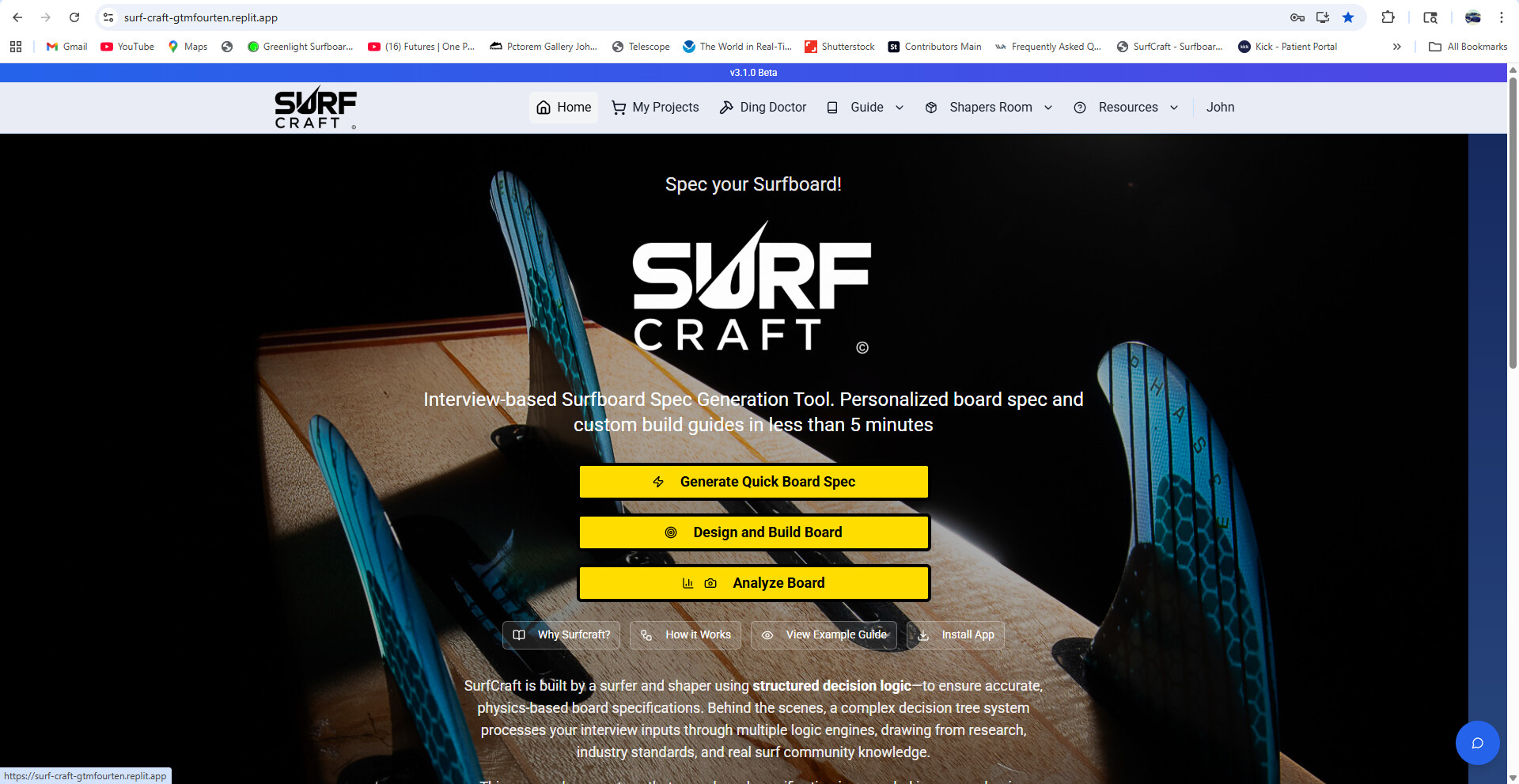
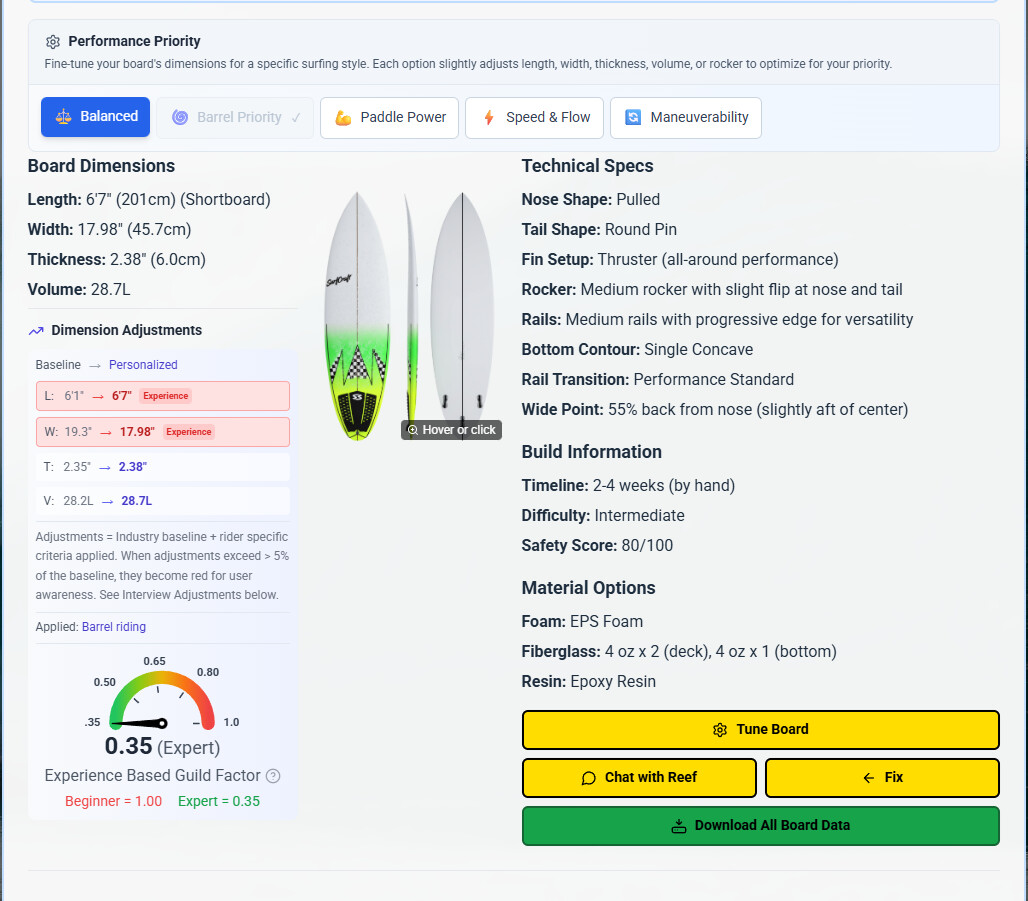
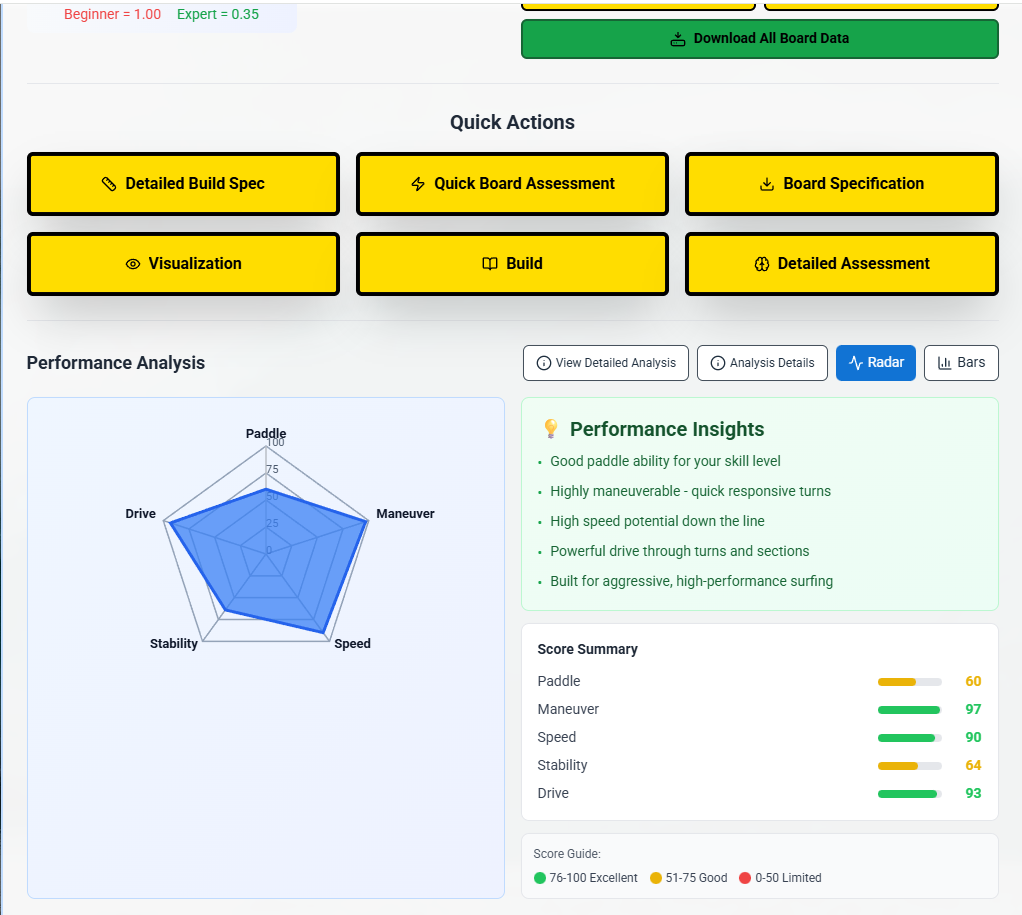
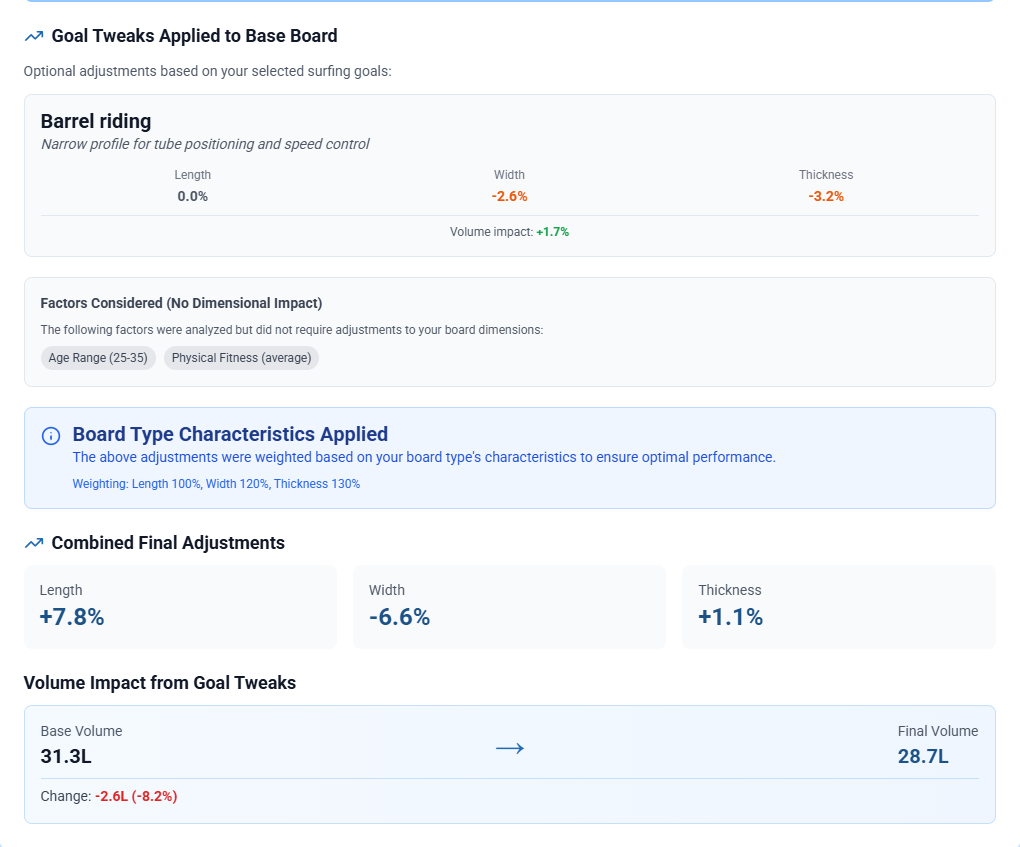
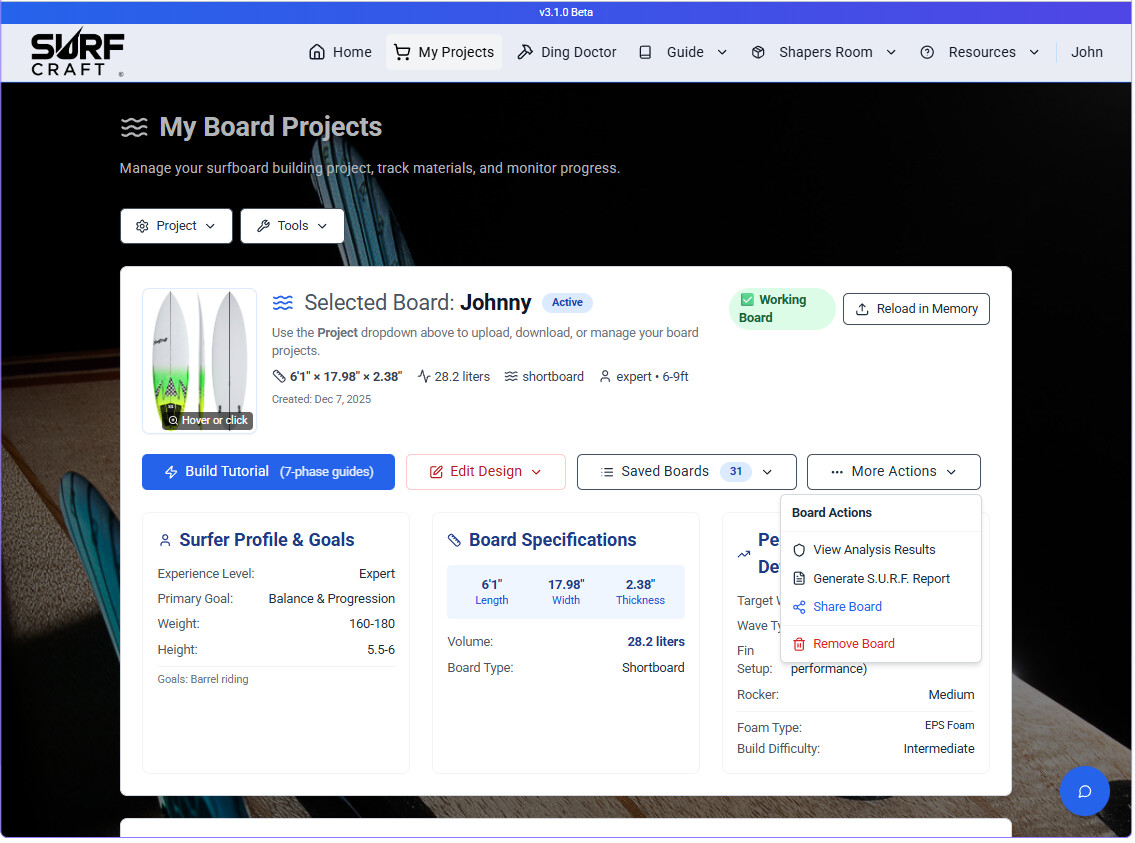
Been plugging away at the app, creating various engines to support specific functions to differentiate nuance between riders, certain board types etc and focusing on feedback UI. The interviews (Express and full) are each worth a try to see the differences. I just finished a heavy modification to the full interview which really breaks down some realistic considerations that are weighted for guild factor (small tweaks to the initial baseline chosen from the 500 board database). The analysis results are shown in the images. The interview is pretty cool and addresses real world surfing challenges. Weighting may be adjusted later but they seem to work and this gives valuable feedback. AI tools are available but not what produces the boards. The difference between AI and what SurfCraft provides the user is really dependent upon the users interest. SurfCraft provides a tremendous amount of feedback and is loaded with some tools to play around. Kinda like a surfboard research and design tool with output specs, build tutorials etc that can be a big help or just fun to play with. Its far more than what it was. Still some bugs here and there but alternative functions to overcome (Two interviews, different selections etc). I hope this shows considerable improvement. The My Projects page works better as well, storing boards with full data for recall, re-analysis, download and sharing. I created a 153 board image database myself by literally applying various graphics, logos, stringers, fin boxes etc to baseline drawings and then ran them through Photoshop AI to apply realistic 3D shading etc. (All manual for all 153 boards) They are called based on the generated board type, length, fin setup, tail and sub type. These images appear and dynamically change during fine tuning (another option to change or tweak design before saving to a specification you can download). The specs get the image too. Anyway, the images work and there’s enough to cover just about every board type and style. I think they’re as good or better than most I’ve seen and certainly close enough to give you an understanding. There’s enough variations to get a different board for many lengths within the same category, meaning I didn’t simply duplicate the same image for a board type. I capped the user limit to 20 boards with full data, each downloadable. They are automatically stored under the user profile with full data so they can be brought back into the analysis engine again. There are AI prompts automatically built throughout the app to Build shaping guides for your board, get an outside opinion using ChatGPT or other AI model, and pass to Gemini for image generation. (Gemini still sucks). There’s a Quick Board Assessment with a photo option and image handling tool for snapping photos of a board and passing to Chat GPT 5.1 for an assessment. It worked surprisingly well. The prompts are all written and tested in SurfCraft and then passed to your clipboard automatically, making it very easy to simply paste. Some are very comprehensive (Detailed vs BLUF analysis/Assessment). There’s alot going on to play with overall. With so many tools and UI, there’s going to be a glitch here and there. I build when I get ideas and often times deal with code breaks or other issues as I introduce new features. Believe me, there’s serious work in this. It’s very important that over time it becomes more accurate and as some of the AI models improve, the app will too. Keep in mind, the AI is only in the app where it makes sense. Lastly, on the interview “Design and Build Board” you will see a purposeful breakout for beginner, Intermediate, Advanced and Expert. These set the Guild factor based on many things. Take a look. “Why SurfCraft” touches on some of my Surf background….maybe it’ll help a little.  Be Safe!
John

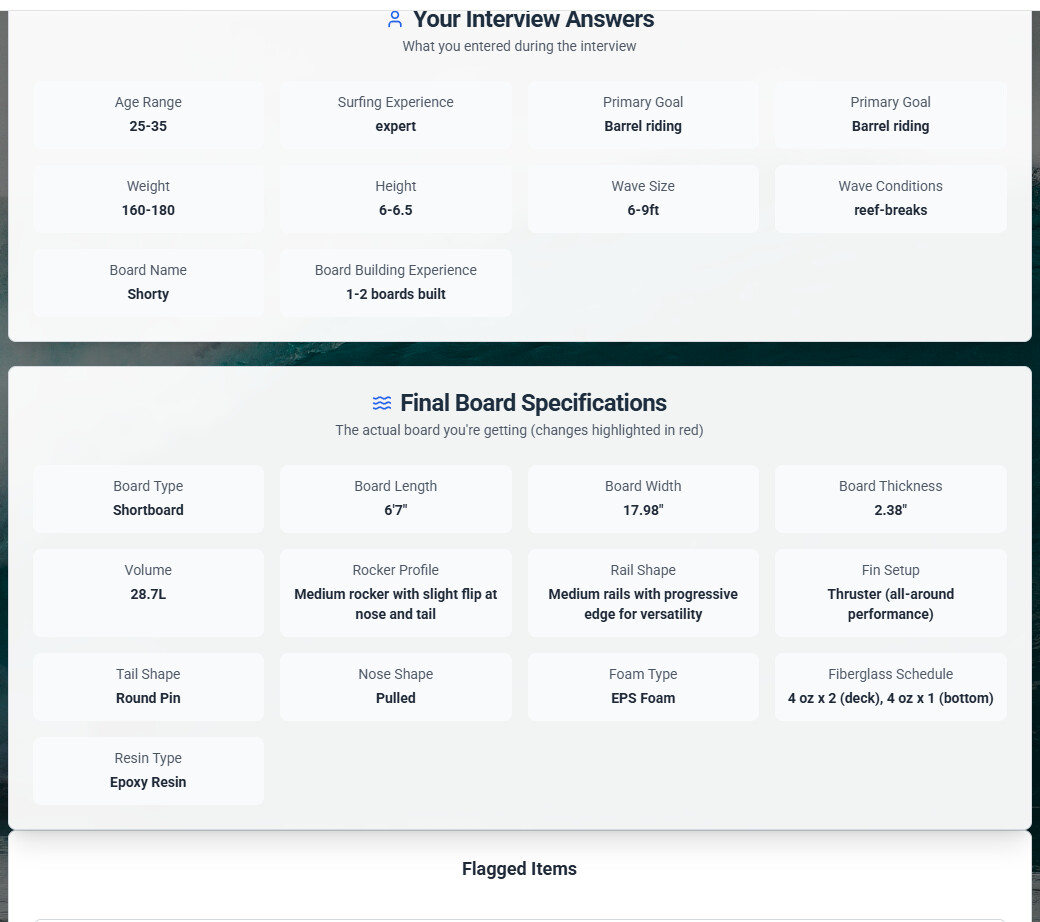
So is the software allready producing a file that can be sent to a cnc machine for a cut?
Or at least printable templates of outlines and rocker profiles?
Did you created the digital shaper allready?
congratulations on all the work you have done your skillset is impressive along side with what you created, really the output of your work needs to be a .brd file or a .s3dx or cad file.
if you reach that point in my humble opinion you have created a monster app.
cheers and good waves
I appreciate the words. I went down a rabbit hole, although briefly, to see what it’d take. The road takes a sharp turn using conventional coding behavior. You’d still need a full blown CAD capable development engine to produce the files. That’s something I’ve not prioritized (Time, cost, complexity) but it’d sure be cool. It could be a start to finish SurfBoard tool with entry points for anyone at any level. I invite ideas - Maybe a bridge - to combine. I leave this open as a goal whether myself or with help if anyone has ideas. I don’t think we’re far from being able to take the output and converting to a model but it’ll take extreme accuracy. I’ll look at this more.
Right now, I’ve finally got it to nail specs pretty well for most boards - beyond AI which never gets the full story based on a casual input from most people. The goal is for engagement and thought through the process, learning, tweaking, questioning and seeing the results inside and outside the app. That was step one - good results and feedback that made sense. Clarity, lots of questions answered…lots of data of what’s happening displayed. Step two (in my head right now) is to have a good working space (My Projects). Boards saved with full data and easy recall and display with all interview, adjustments, spec, analysis and option functionality intact. It seems to be working better (Changes yesterday and today). Thought here is for users, shops or even shapers to have a way to capture and store ideas, share, engage and finalize. Profiles can be stored, referenced and collaborated on. In the shops I visit (I do often to listen and discuss boards) I recognize the collaboration and engaging discussions on particulars and real world situations. I’m trying to drive this into the app. Not just simple B.S. This is important and why you see so much data based functionality and feedback. A user can develop a board, share it with another user (email the board file), collaborate on it etc. If tweaks are needed, the user can fine tune etc. So it’s setup primarily for engagement across all levels to ultimately generate a spec or understand. (Not even talking about the AI powered Ding Doctor, Photo board assessment and other stuff).
So, wouldn’t it be nice to hand off a file? Absolutely! With new technology and API’s (Backends to powerful web based tools), maybe we’re not too far off. (Maybe it’s there and I just haven’t found it yet because I’ve been busy just getting it to where it is. So, I’ll dive deeper as the foundation becomes more solid. Thanks again!!
John